 LUDO ZAP
Play Ludo Online with Friends
Updated
Ludo is best with people you know. Ludo Zap lets you play Ludo online with friends and family wherever they are: create a private room, share a code and start a game for 2 to 4 players. Here's how it works.
Three ways to play
- Private room: friends only, 2 to 4 players. The host starts the game when everyone is in.
- Quick Match: online 2 or 4 player games with other players. If seats are still empty after 10 seconds, bots fill them.
- vs Bots: practice in a 2 or 4 player game against bots, any time.
For Quick Match and vs Bots, choose 2 Players or 4 Players on the home screen first.
How to create a private room
- Install Ludo Zap from Google Play and pick a player name. There's no sign-up.
- On the home screen, tap 🏠 Private, then Create a room.
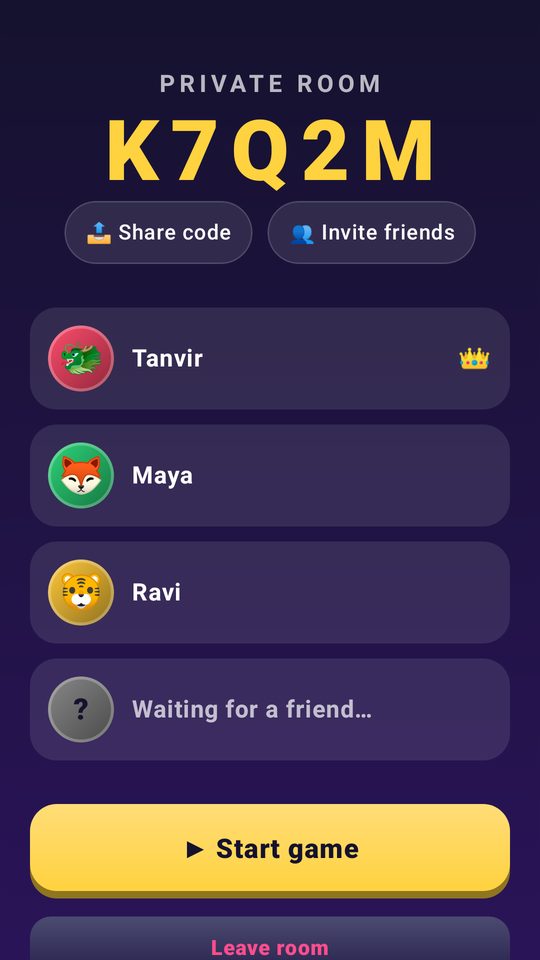
- Your room gets a 5-character code of letters and numbers, such as K7Q2M. Tap 📤 Share code to send it through any chat app, or 👥 Invite friends to invite Ludo Zap friends who are online.
- When 2 to 4 players are in, the host (👑) taps ▶ Start game.
How to join a friend's room
- With a code: tap 🏠 Private, type the 5-character code and tap Join room.
- With an invite: if you're friends in the game, a Game invite pops up while you're online. Tap Join room.
A room holds up to four players, and nobody can join while a game is in progress. If the host leaves, the next player in the room takes over as host.
Add friends and invite them
You can add anyone you've played a match with. Tap their name during the match and choose ➕ Add friend, or open Friends and find them under Recent players. Once they accept, you'll see when they're online and can invite them straight into your room.
Chat, reactions and staying friendly
- Send emoji reactions, tap quick messages like "Good luck! 🍀", "Nice move! 👏" or "GG 🏆", or type your own, up to 80 characters.
- Messages only reach players in your match, and names and chat pass through a filter.
- Tap any player to 🔇 Mute their chat and reactions, or 🚩 Report them.
- Ludo Zap is for players 13 and over.
Rematches, dropped connections and fair play
- Rematch: when a private game ends, the host taps 🔁 Rematch and everyone still in the room plays again. Quick matches offer ⚡ Play again.
- Dropped connection: reopen the app within a minute to get your seat back. Meanwhile a bot keeps your tokens moving.
- Someone leaves: a bot takes over their tokens so the game can finish.
- Fair dice: every roll happens on the Ludo Zap server, so nobody's phone can fake a 6.
Tips for a great Ludo game night
- Everyone needs Ludo Zap on an Android phone (Android 8.0 or newer) and an internet connection.
- Three of you? Use a private room. Quick Match and vs Bots games are always 2 or 4 players.
- Two-player games put you on opposite corners for a straight head-to-head race.
- Turn timers keep things moving: each step of a turn has 15 seconds before the game plays it for you.
- New to the rules? Send everyone the how to play Ludo guide and the power-ups guide first.
Playing with friends FAQ
Can I play Ludo with friends who live far away?
Yes. Private rooms work over the internet, so friends can join from anywhere with your room code.
Can three people play Ludo together?
Yes, in a private room. The host can start with 2, 3 or 4 players, while Quick Match and vs Bots games are always 2 or 4.
Do my friends need an account?
No. They install Ludo Zap from Google Play, pick a name and join with your code.
Are there bots in private rooms?
Not at the start: private rooms are for real players. A bot only steps in if someone leaves or loses connection, so the game can finish.
Start a game with your friends
Get Ludo Zap free on Google Play, create a room and send the code. No ads, no sign-up.